

Courses

myATU
A new way of organising your student life is here!
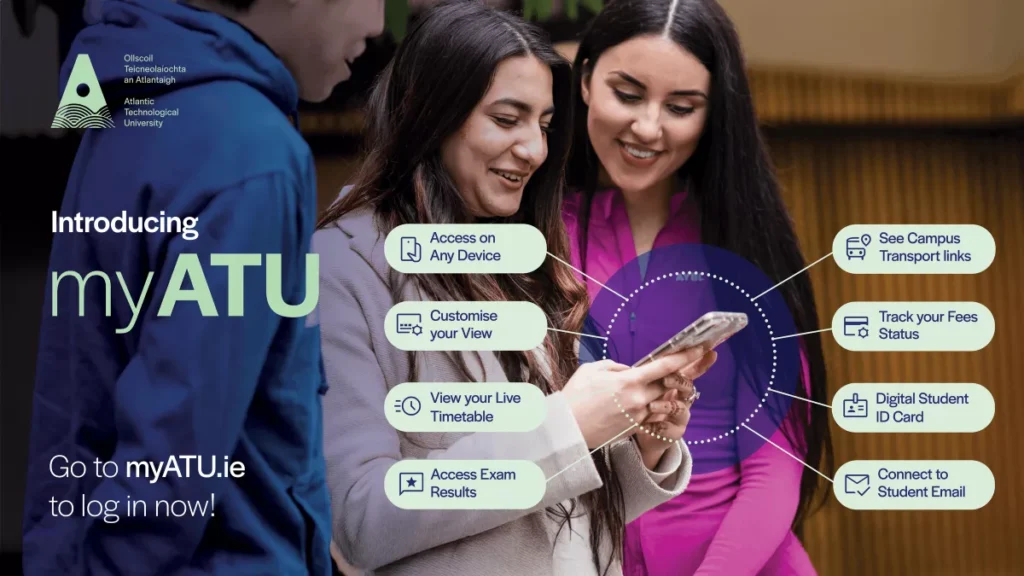
What is myATU?
myATU brings the ATU services and information you rely on into one easy-to-access space.
What can myATU do?
Here are some of the current features of myATU:
- Find out what’s on: The events widget allows you to see what’s happening online and on-campus
- Find your way round campus: Navigate your campus with way-finding tools
- Stay on top of your admin: Our registration tracker alerts you if you need to complete your registration tasks.
- Exams results at your fingertips: View your results in your dashboard and never miss a release date again!
- Stay connected: Get easy access to your student email and Outlook calendar.
- Keep on top of your timetable: View your personal academic timetable in a user-friendly format. See your exams schedule alongside your classes in one view.
We’re continuing to develop new features and improve myATU based on student feedback. You can help shape what comes next by using the feedback form on the dashboard.
Where can I go for help with using myATU?
For support using myATU, you can raise a new support request. If you’re on campus, you can also visit your local IT helpdesk. Or contact the IT helpdesk by phone:
- ATU Donegal: 074 918 6050
- ATU Galway-Mayo: 091 742799
- ATU Sligo: 071 915 5222
- ATU St Angelas: 071 914 3580
FAQs
How can I give feedback on myATU?
We welcome feedback. Let us know what you like and don’t like about using myATU – we are continuously working to improve and update the platform based on your feedback. You can report issues via the feedback form found within myATU or via the IT helpdesk.
If you’d like to be more involved, you can sign up to take part in future user testing and feedback sessions/focus groups to help improve myATU.
What device can I use myATU on?
You can access myATU from all web browsers and across any personal device whether it be laptop, phone or tablet.
Why don’t I have to download myATU to my phone?
myATU is a web-based app – web apps don’t require users to download them, making them easy to access. myATU automatically receives software and security updates so it is always up to date.
Can I access myATU offline?
No, you will need to be connected to the internet to use myATU.
How can I save myATU on my phone?
To see myATU as an app-style icon on your Home Screen, complete the following steps depending on your browser:
Android (Samsung Internet)
- Open Samsung Internet.
- Go to the website.
- Tap the ≡ menu (bottom right).
- Tap Add page to.
- Choose Home screen.
- Rename it if you like and confirm by tapping Add.
How do I add my timetable to my dashboard in myATU?
The platform does not automatically recognise your timetable – first you must select and save your timetable. For students in Galway-Mayo and Sligo you will do this at the start of the academic year. For Donegal students you will need to do this at the start of each semester.
- Visit timetables.atu.ie (click the link in the heading in the timetable section of myATU to go straight there)
- Search and find your timetable
- Scroll to the bottom of the timetable and click the button “Save as MY timetable”
- Refresh the myATU screen and your timetable should now appear.
How can I suggest a new feature for myATU?
Share your idea with us by leaving feedback in the Feedback form available on your dashboard.
Do I need to pay for myATU?
No, myATU is free to all students.
Do I need to sign in to use myATU?
Yes, myATU is available through the single-sign on which lets you access multiple applications and services with one set of credentials.
So you should login using your normal ATU student email and password.
How do I change what widgets I see on my dashboard?
You can go to customise view and subscribe to the services you want to see on your dashboard. Check back regularly as we will be releasing new features on a regular basis.
Does myATU replace the StudentHub?
No, for details of student services and how to access supports please refer to the StudentHub – you can find a quick link to the hub within myATU.
What can I use my digital student ID card for?
Your digital student ID card can be found by clicking on your profile picture in the top right of your dashboard.
It can be used for:
- Accessing student discounts.
- Checking out books at the library.
- Proof of student status.
It cannot currently be used for:
- Photographic ID for exams.
- Door access.
- Printing services.
Can students add events to the listings on myATU?
Students should contact their local SU team to submit events.
Staff FAQs
I’m an ATU member of staff, can I access myATU?
Yes, although at the moment myATU is only designed for student users. You will still be able to access myATU using your usual ATU staff sign in, however there is no specific content created for staff. If you are a member of staff and would like to get involved with research into creating a staff profile in myATU, sign up here.
How can I add a student event to myATU?
Staff can submit student event listings via the Event Request tool on the left hand sidebar menu. Admin access is also available on request if you run regular student events.
MyATU Release Notes
Check here for details of new features on myATU, issues resolved or improvements that have been made to enhance your experience.
29/5/2026 Release
The following features are now available on myATU:
- Events widget
View what’s on on-campus and online. Filter by event categories. - Campus Noticeboard
View posters from the digital screens on-campus.
30/4/2026 Release
This initial release of myATU includes:
- Registration Dashboard
Quickly view your current registration status from student self-service Banner. - Fees Alerts
In-app notifications alerting you to upcoming fees deadlines. - Timetable with Integrated Exam Schedule
Access your full class timetable along with any available exam dates. - Exam Results Viewer
Check your latest published results from student self-service Banner right from your dashboard. - Campus Maps
Easily find your way around campus with interactive maps (available in ATU Donegal (Letterkenny), ATU Galway (Dublin Road), ATU Galway (Wellpark Road), ATU Mayo, ATU Sligo) - Digital Student ID Card
Your student ID is now on your phone and can be used with library self‑service machines to check out books and access student discounts. (Note it is not valid as photographic ID for exams). - Rail & Bus Connections
Save your bus or rail route timetables to make your commute to campus smoother. - OneDrive files
Get quick links to your recently accessed files on One Drive. - IT helpdesk
View the status of your IT helpdesk support requests. - ATU News
Get the latest news headlines from ATU.ie.